
AI-assisted product proof
I Built a Chrome Extension With AI in a Weekend
A practical case study of how one annoying workflow problem became a working Chrome extension proof of concept over a weekend, and why making it real took more than fast code.
The first product I built with AI was not an abstract experiment.
It came from an annoying work problem.
One of my engineers was working on a customer-facing dashboard, and I needed to give feedback on what I was seeing. Because I work in an environment with high security standards, I could not just download another feedback tool onto my corporate computer.
So the workflow was painfully manual: take a screenshot with the Windows Snipping Tool, draw rough circles or boxes around the issue, send the screenshot, and then type the comment separately in a message.
It worked, technically. But it was slow, messy, and easy for context to get lost.
That was the moment the Chrome extension idea became obvious: I wanted to click on a page, leave visual comments in context, and turn the whole review into a clean handoff.
With AI, I had a working proof of concept running in Chrome over a weekend.
The Problem Was Easy To Feel
If you have ever reviewed a website, dashboard, landing page, or prototype, you probably know this problem.
The feedback is rarely just a sentence. It is tied to a specific place on the screen.
That is where normal messages get clumsy. The visual context and the written comment start living in different places.
- This label is unclear.
- This button should stand out more.
- This section needs more breathing room.
- This card feels visually disconnected from the rest of the page.
- This screenshot needs to stay attached to this exact comment.
My Approach To AI Coding
Before I started building, I knew I needed more than a prompt.
The important thing was creating a structured, repeatable workflow with proper guardrails. AI can be highly inconsistent. That makes it useful for open-ended exploration, but risky for work that needs to be done carefully and predictably.
Some tools, including Kimi and Codex, have planning features that let you flesh out a plan before execution. I found that helpful, but not sufficient. Even with planning, the results could still vary too much from one project to another.
So I created a task intake template for my Codex work. The point was simple: make the request clearer before the AI starts changing anything.
- Goal/Problem Statement: What problem am I solving, and what should be true when the task is done?
- Scope: What is in scope, and what should not change?
- UX: What visible user experience, copy, or behavior needs approval before implementation?
- Acceptance Criteria: What evidence would prove the work was completed correctly?
- QA: What validation should run before the change is considered ready?
The First Proof Of Concept
The first version was intentionally narrow.
Visual Feedback Capture is a browser extension for marking comments on webpages and turning those comments into a cleaner handoff.
I was not trying to build a full bug tracker, project-management system, or enterprise feedback platform. I was trying to solve the painful part I understood personally.
- Turn on review mode on the current page.
- Click an element or drag over an area.
- Write a comment tied to that spot.
- Keep the comments locally in the browser.
- Preview the captured notes.
- Copy a structured handoff when ready.
The Weekend Version Was Real
By the end of that weekend, this was not just an idea in a chat window.
The extension could load in Chrome. It could inject a review UI into the page. It could collect comments. It could preserve a review session locally. It could generate copyable output.
That mattered to me because this is where AI-assisted building started to feel less theoretical.
A lot of people are still asking whether this path is real or just hype. My answer after this project is simple: you can build something useful much faster than before, especially if you start with a small problem you understand clearly.
Three days later, I published it on the Google Chrome Web Store. Codex was able to package the extension in the required format and walk me through the submission process. It also helped generate the landing page, privacy declarations, support page, and the demo video above.
The Chrome Store screenshots are useful because they show the actual workflow instead of just describing it. If I am saying AI helped me build a real browser extension, readers should be able to see the product states.
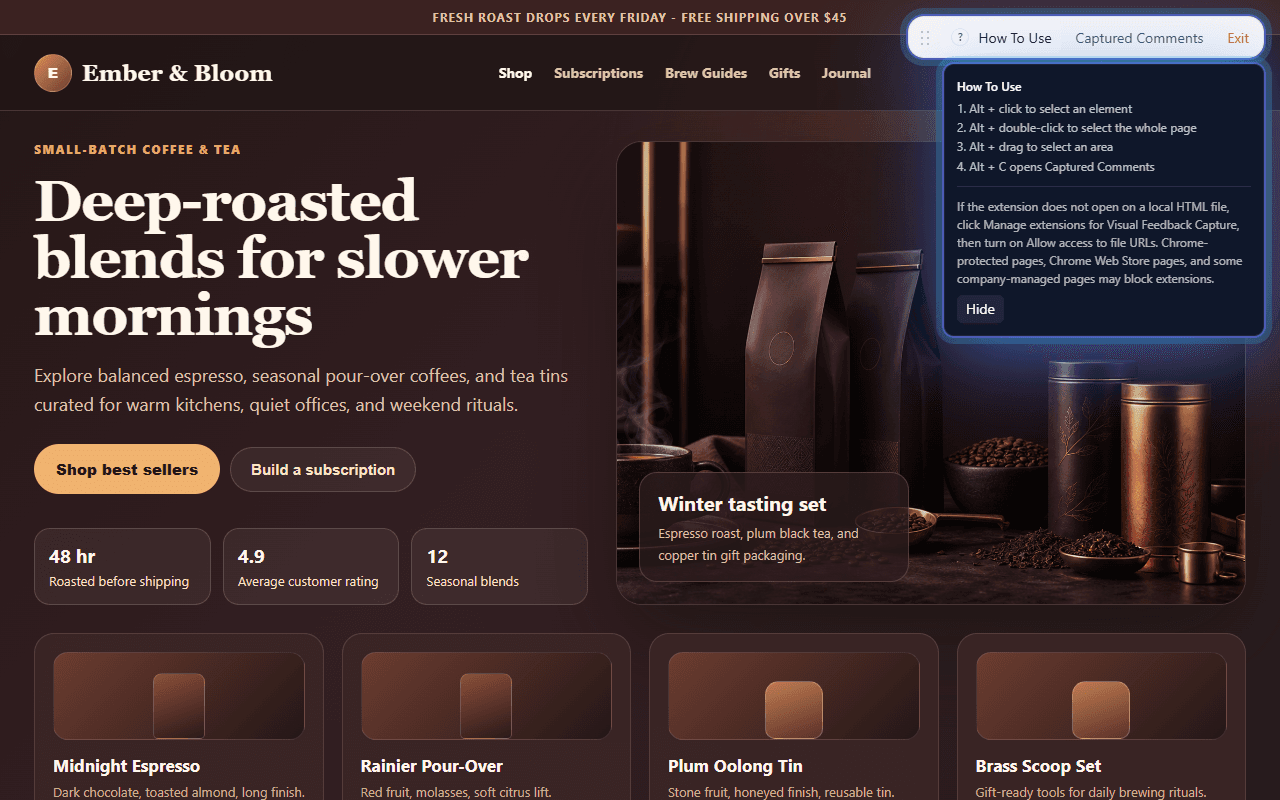
Visual Feedback Capture Chrome Store screenshots.
Start review mode and see the lightweight toolbar.
Why The MVP Was Security-Conscious
Because the original use case came from a high-security work environment, I did not want the MVP to feel casual about data.
The product boundary needed to be easy to explain: local-first, no account required, no backend required for the default workflow, and no automatic upload.
That constraint made the first product less ambitious, but it made it easier to trust.
- Use the active browser tab only after the user starts review mode.
- Store captured comments locally.
- Let the user decide when to copy or export.
- Avoid broad permissions in the first MVP.
- Avoid unnecessary network behavior in the default workflow.
What AI Made Faster
AI compressed the distance between idea and working prototype.
Instead of spending the whole weekend figuring out the first shape of the extension, I could move through the pieces quickly and keep testing the result in the browser.
The speed mattered because every working version gave me something concrete to react to.
- Drafting the first extension structure.
- Building and revising the review-mode toolbar.
- Creating element and area selection behavior.
- Debugging browser behavior and state issues.
- Iterating on the copyable handoff output.
- Preparing store-facing screenshots, demo material, and product copy.
What AI Did Not Magically Solve
The weekend build proved the idea. It did not mean the product was finished.
Turning a proof of concept into something I was willing to publish required slower work that AI could help with, but could not own for me.
That is an important distinction. AI made the first usable version faster. Product judgment still had to decide what was trustworthy, clear, and ready for someone else to install. In particular, AI is surprisingly bad when it comes to human understanding and empathy, so it simply cannot communicate in a way that resonates with human emotions.
- UX design
- Go-To-Market strategy
- Choosing good screenshots
- Creating a user-friendly demo video
- Human-centric messaging and tone
The Takeaway
If you are wondering what you can realistically build with AI, start smaller than your imagination but bigger than a toy.
Pick a painful workflow you personally understand. Build the smallest useful version. Make it clickable. Then learn from where it breaks.
The Chrome extension was proof for me that AI can help one person move from problem to usable product much faster. It was also proof that the human still owns judgment, trust, and release quality.
If you want to see the extension itself, Visual Feedback Capture is available on the Chrome Web Store.
What Comes Next
The next thing I learned is that once a proof of concept starts becoming real, the AI subscription is no longer the whole story.
You start needing the supporting stack: GitHub, hosting, store assets, privacy pages, support pages, release checks, and a clean preview-to-production process.
That is where the next article goes: the minimum tool stack you need once an AI-assisted experiment starts becoming a real product.